

In this article, we’ll explore how these two systems should interact and what the ideal data flow looks like. We won’t dive deep into configurations—otherwise, this article would turn into a full-on manual—but by the end, you’ll have a clear understanding of how they complement each other to create a streamlined workforce management strategy.
Architeture
The integration flow between these two systems should essentially follow this structure:
- Replicating master data to SAP Fieldglass.
- Creating the VMS Job Requisition from EC Position Management.
- Replicating worker data from SAP Fieldglass to Employee Central.
Replicating Master Data
Master Data From ERP
If you’ve ever worked on a system integration, you’ve probably noticed that one of the biggest challenges is data standardization. More often than not, we end up sending information—like a cost center—that simply doesn’t exist in the target system. Or even worse: it exists, but with a completely different identification code.
These discrepancies create a lot of extra work, leaving us with two choices:
1️⃣ Build a data transformation logic so complex that it becomes a nightmare to manage.
2️⃣ Completely restructure the data in one of the systems, impacting multiple processes.
To avoid these issues, whenever an ERP (Enterprise Resource Planning) is in place, it should always be the primary source of master data for all other systems. This ensures that data is synchronized and standardized across platforms, using the same codes.
This is a best practice for any system integration, not just the one we’re discussing here.
Below, you’ll find a diagram illustrating a master data integration where nothing is created in the target system. In this case, SAP Fieldglass receives data maintained in S/4HANA and SuccessFactors, making worker and position integration much simpler and more efficient.
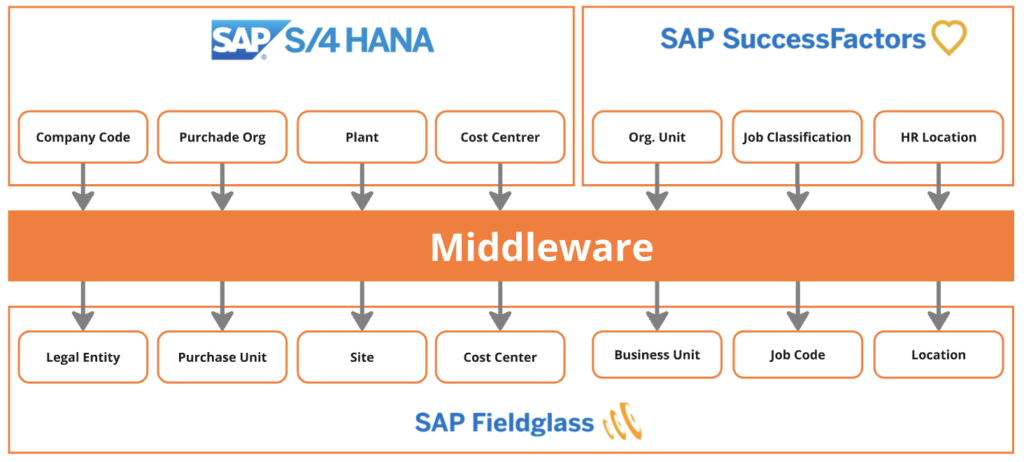
Master Data without an ERP
What If There’s No ERP? Then the approach changes slightly. In this case the Employee Central becomes the main source of master data, sending information directly to SAP Fieldglass.
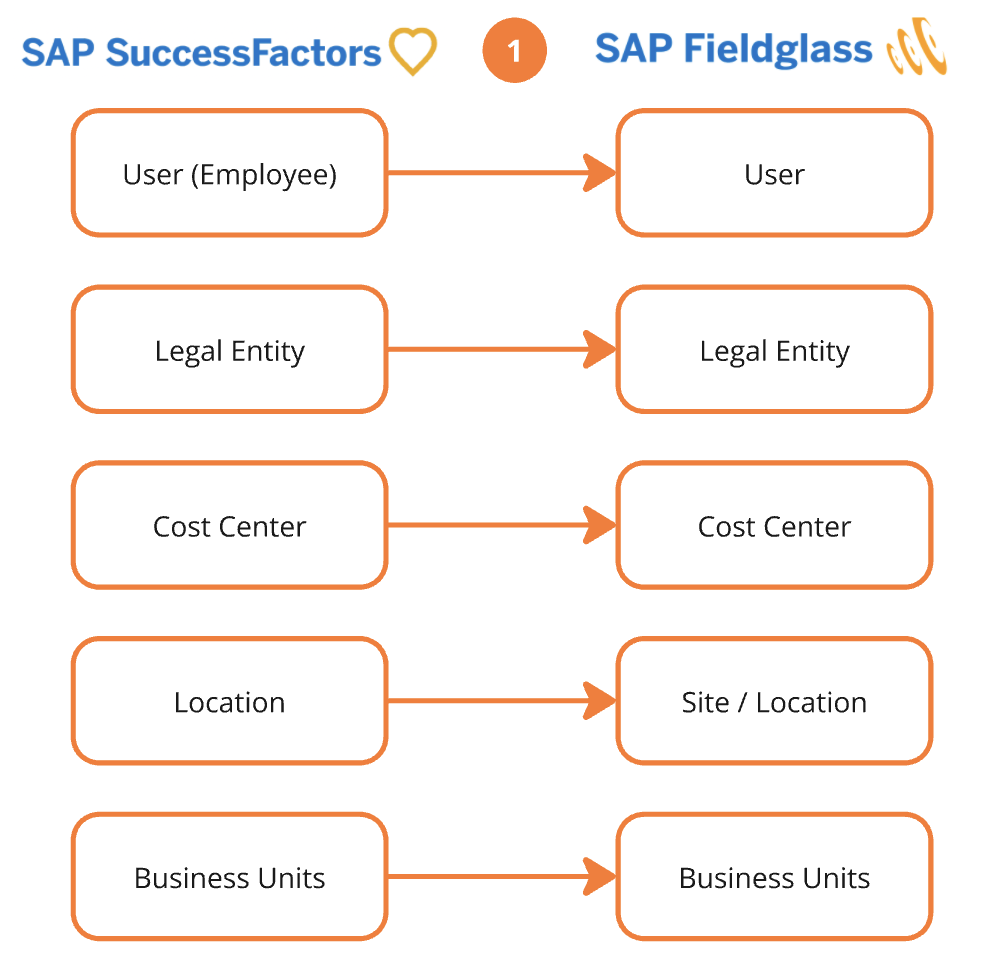
Employee Central Pre-Requisites
- Enable “Contingent Workforce Management” feature. <Official Documentation>
- Establish SSO authentication method between SAP SuccessFactors and SAP Fieldglass. <Official Documentation>
Fieldglass Pre-Requisites
Create Job Posting Templates
It is recommended two options for defining the Title of job posting template:
- Job Title from Position and Job Level Code (External Code) from the Job Classification
Example: Position has Job Code “Marketing Manager (MKT-MGR)”. This Job Code (Job Classification) is assigned to Job Level “Supervisor (SUP)”. The job posting template Title is Marketing Manager | SUP. - Job Code from Position and Job Level Code (External Code) from the Job Classification
Example: Position has Job Code “Marketing Manager (MKT-MGR)”. This Job Code (Job Classification) is assigned to Job Level “Supervisor (SUP)”. The job posting template Title is MKT-MGR | SUP.
Create Custom Fields
For data synchronization, connectors need to be enabled and configured to match Employee Central fields.
- Company Code (mandatory)
- Position ID
- Job Code
- Job Level
- Pay Grade
- Employee Class
Enable/Configure Connectors
Integration connectors listed above must be enabled and a variant must be created, matching the corresponding fields in Employee Central. <Enabling Fieldglass Connectors>
- User Upload
- Pick List Upload
- Legal Enity Upload
- Cost Center Upload
- Site Upload
- Business Upload
Job Requisition Flow
With both systems configured and master data replicated to SAP Fieldglass, now it’s time to get to the good part! With this setup, the manager can create a job posting in SAP Fieldglass directly from a vacant position in Employee Central’s Position Org Chart—saving time and reducing manual work.
This feature only applies to contingent workers, since they are typically managed through job requisitions in SAP Fieldglass, and to get the full benefits of the integration, each position in Position Management should have a “matching” job posting template set up in SAP Fieldglass. What if there’s no matching template?
No problem—you can still create the job posting manually. The only downside is that position data won’t be auto-filled, so you’ll need to enter it yourself.
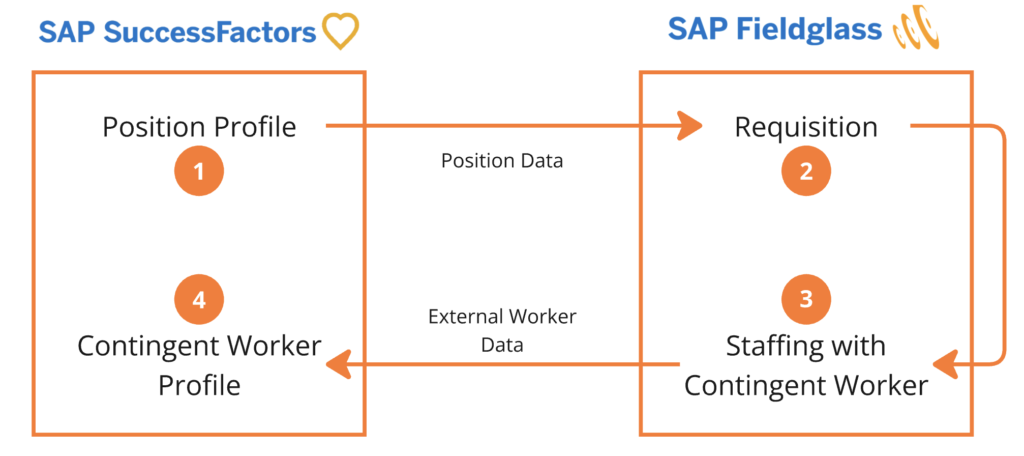
How Does It Work?
Once the integration is set up, the process is simple:
1. Start in Employee Central – A user clicks “Create SAP Fieldglass Requisition” from a vacant position in the Position Org Chart. The system then authenticates the user via SSO between SuccessFactors and Fieldglass.
2. Auto-Fill Job Details – SAP Fieldglass pulls key data from Position Management, such as Job Title, Job Level, Currency, and Position Owner, and automatically fills in these details in the job posting.
3. Finalize & Submit – The user is redirected to SAP Fieldglass’s Create Job Posting page, where they can review, edit, and submit the posting for approval and supplier distribution.
This integration eliminates duplicate data entry, reduces errors, and makes hiring contingent workers faster and more efficient. If your company is using SuccessFactors and SAP Fieldglass, this is a must-have feature to streamline your processes.
Conclusion
System integration may seem like a challenge, but when properly implemented, it becomes a reliable and easy-to-maintain process. The key is ensuring that the integration runs smoothly without relying on temporary workarounds to keep operations moving.
Beyond that, integrations eliminate redundant work, significantly reduce manual errors, and create a much more seamless workflow between different departments. Companies function as interconnected ecosystems, and when data flows automatically between systems, users gain valuable time to focus on strategic tasks instead of getting stuck in repetitive, low-value activities.
At the end of the day, integration isn’t just about automation—it’s about improving quality of life at work!