
If you’re following us, you likely have experience with SAP Fieldglass and may have worked with Rates in some capacity. Throughout my projects and support roles, I noticed a common trend—everyone was using Rates 1.0!
That got me thinking—I wasn’t entirely sure about the differences between the two rate structures either. So, I decided to dig deeper. What I discovered allowed me to propose improvements, streamline rate maintenance, and bring more flexibility to rate management.
Let’s dive into this topic today and clarify everything!
A Bref Revision of Rates in SAP Fieldglass
Rates are a key component of SAP Fieldglass, determining how Buyers and Suppliers handle invoicing for workers and services. At its core, a rate follows this formula:
Pay Rate + Rate Components = Bill Rate
- Pay Rate: The amount paid to a worker per hour, day, or month.
- Rate Components: Additional costs like fees, markups, and operational expenses that contribute to the final bill.
Rate Categories
When creating a rate, it must be assigned to a Rate Category, which helps organize rates and track submitted time. SAP Fieldglass provides three default categories:
- ST (Standard Time) – Regular working hours.
- OT (Overtime) – Additional hours worked beyond standard time.
- DT (Double Time) – Extra compensation for specific conditions, such as working holidays or extended overtime.
Rate Components & Rate Component Groups
Rate Components are optional and allow for additional charges such as taxes (e.g., VAT), national insurance, and service fees. These are used to define the difference between a Pay Rate and a Bill Rate.
When a Buyer includes Rate Components, they are grouped into Rate Component Groups to ensure proper application. These groups define how and in what order each additional cost is applied. While flexible, one exception exists: MSP Fees (Managed Service Provider Fees) and Coefficients (used with Rate Schedules) are always applied last.
Calculating the Final Rate
Before setting a Bill Rate, Buyers and Suppliers typically negotiate pricing based on multiple factors, including market conditions, regional regulations, and business strategies. There are different ways to structure rates:
Basic Rate
The simplest structure, where a Buyer only sets a Bill Rate, without visibility into Pay Rate or Rate Components. For example, a company hiring a Engineer may set a maximum rate for the Supplier, who then presents this as the final Bill Rate in SAP Fieldglass.
Factor-Based Rate
This method applies a multiplier to a base rate. Instead of creating separate overtime or double-time rates for each role, a Factor simplifies calculations.
For example, a company might set Overtime (OT) at 1.35x the Standard Time (ST) rate and Double Time (DT) at 2x. By applying these factors, multiple roles can use the same overtime calculation without defining unique rates for each position.
Pay Rate-Based vs. Bill Rate-Based
Organizations using Rate Components must decide whether rates are calculated using a Pay Rate-Based or Bill Rate-Based approach:
- Bill Rate-Based: The Bill Rate is set first, and the Pay Rate is derived after subtracting fees. This approach provides Buyers with visibility into how a Supplier structures its fees.
- Pay Rate-Based: The Pay Rate is set first, and the Bill Rate is determined by adding applicable Rate Components. This method ensures that the worker’s wage remains fixed, which is a legal requirement in certain countries.
For example, if a Supplier negotiates a Bill Rate of 100, with 75 going to the worker and 25 covering the Supplier’s fee, the Buyer can see the breakdown of costs. Conversely, if a Pay Rate-Based structure is used, the worker’s wage stays fixed, and the Bill Rate may fluctuate depending on the Supplier’s margin.
MSP Fees (Managed Service Provider Fees)
A Managed Service Provider (MSP) is a third party that helps companies manage contingent workers. MSPs charge a fee for their services, and this fee can be applied in two ways:
Supplier-Funded Model: The fee is deducted from the Supplier’s payment, meaning the final Bill Rate seen by the Supplier may be different from what the Buyer sees in SAP Fieldglass.
Buyer-Funded Model: The Buyer pays the MSP fee, usually as a percentage of total contingent labor spend.
Rates 1.0 Structure
Worker Rate data in SAP Fieldglass revolves around five key variables:
- Job Title – Specifies the worker’s role.
- Supplier – The unique code of the supplier company.
- Site – The location where the work will be performed.
- Rate Category – Indicates the time measurement type (e.g., standard time, overtime, or double time).
- Unit of Measure (UOM) – Defines how the rate is measured (e.g., hours, days, or units).
These variables form the foundation for worker rates and collectively contribute to an organization’s Rate Card—a term describing all rate data used by the organization.
Rate Card in SAP Fieldglass
In the Rates 1.0 structure, the Rate Card translates into two key components:
- Rate Groups – Represent all potential rates for a specific job, supplier, or site.
- Rate Grids – Function as a matrix that consolidates rate variations, automating rate selection for Job Postings and SOW Worker Roles.
Rate Grids are built using a hierarchical structure:
- Rate Category → Rate → Rate Components (optional) → Rate Component Groups (optional) → Rate Group → Rate Grid
This configuration is performed in the SAP Fieldglass Admin Menu from the bottom up. Once the Rate Grid is complete, it is associated with Job Posting Templates or SOW Worker Roles for practical use in procuring workers.

The Rate Admin Object in Rates 1.0
The Rate Admin Object in Rates 1.0 combines two key elements:
- Rate Code – Defined by the five variables: Job Title, Supplier, Site, Rate Category, and UOM.
- Rate Value – The monetary amount associated with the combination of variables.
The naming convention of the Rate Admin Object reflects these variables, standardizing how rates are defined, whether manually or through data uploads.
Example of a Rate
For an Engineer role, supplied by Officium.IT (OF00), based in Portugal (PRT), with a standard daily (ST/DAY) rate of 100, the rate name might look like this:
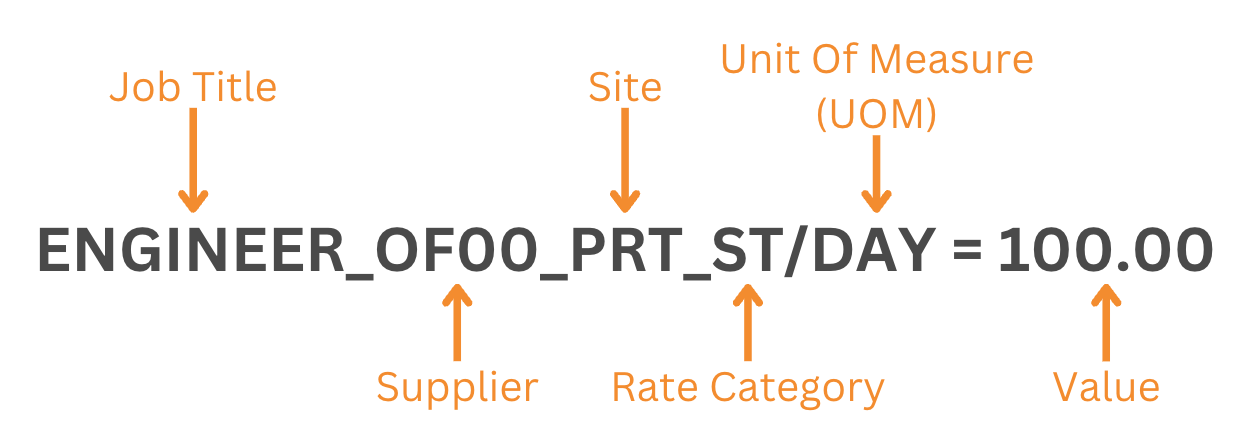
This structured approach ensures clarity and consistency in defining, maintaining, and applying worker rates.
Finally, What is Rates 2.0?
Rates 2.0 simplifies the process of creating rate structures by reducing complexities and the time required for configuration, while retaining the flexibility and functionality of Rates 1.0.
The trick here is that, instead of relying on separate Rate Cards, Rate Groups, and Rate Grids, Rates 2.0 uses Custom Lookups to determine the correct rate for specific scenarios. This enables companies to manage large datasets with custom logic applied across various parts of the SAP Fieldglass application.
The rate structure in Rates 2.0 consists of:
- Rate Category – Defines the time measurement type (e.g., standard time, overtime).
- Rate – The monetary value associated with a worker.
- Custom Lookups – Dynamic tables used to define and manage rate variables, streamlining rate selection for specific conditions.
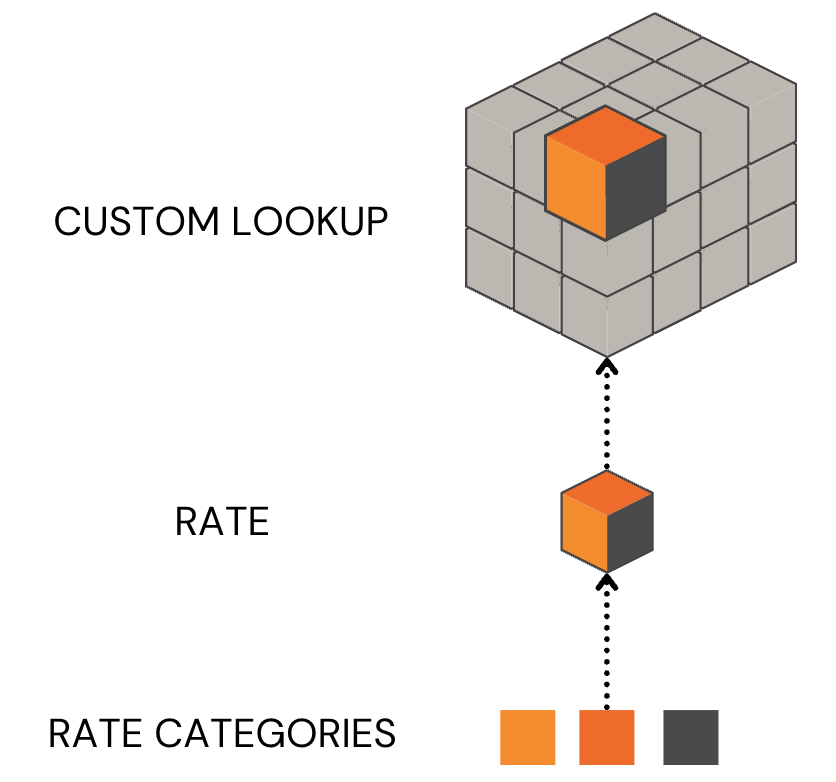
With these elements, the process eliminates the need for Rate Groups and Rate Grids, which were essential in Rates 1.0.
Case Study
In one of my analyses, I compared the current configuration of a client using Rates 1.0 with a migration to Rates 2.0. The client’s rate structure was relatively simple, with only a standard rate defined within the rate card. Overtime rates were set manually when creating Job Postings, and there was no distinction by site—only by MSP companies. Here’s a breakdown of the initial scenario:
- MSP Companies: 3
- Suppliers: 52
- Job Titles: 250
- Rate Types: 1
This seemingly straightforward setup still required a complex system structure:
- Rate Categories: 1
- Rate Codes: 39,000 (Job Titles × Suppliers × MSP Companies)
- Rate Grids: 250
Even with this simple scenario, rate management was labor-intensive. Updating values was straightforward, but when agreements ended or suppliers were offboarded, the process became cumbersome. It required deleting the Rate Grid, then the Rate Group, and finally the Rate—a tedious and time-consuming task.
How Rates 2.0 Transformed the Scenario
After migrating to Rates 2.0, the structure looked like this:
- Rate Categories: 1
- Rate Codes: 1 (Standard Time)
- Rate Grids: 0
- Custom Lookups: 3 (one per MSP)
- Each Custom Lookup containing 13,000 entries (Job Titles * Suppliers).
By centralizing all maintenance within the Custom Lookup, managing rates became significantly easier. Updating values, adding new suppliers, or removing entries for finalized agreements could all be done via a simple CSV upload. This eliminated the need for complex data analysis, multiple configuration changes, and even advanced Excel skills, saving a substantial amount of time and effort.
Why Rates 2.0 Works Better
The shift to Rates 2.0 is made possible by the Rate Admin Object, which consolidates rate variables and values into a streamlined structure. Unlike Rates 1.0, it eliminates unnecessary layers like Rate Groups and Rate Grids, instead relying on a dynamic lookup table.
This approach:
- Simplifies configuration and reduces maintenance effort.
- Supports custom logic for handling complex rate scenarios.
- Increases efficiency, even for larger datasets.
In this case, the migration to Rates 2.0 not only streamlined operations but also highlighted the scalability and flexibility of this configuration for future growth.
Conclusion
Migrating to Rates 2.0 feels like upgrading from a manual car to an automatic—it just makes everything smoother and easier to manage. Through this journey, I realized how much unnecessary complexity we’d been carrying with Rates 1.0, even in seemingly simple setups.
With Custom Lookups and streamlined processes, Rates 2.0 reduces not only the time spent on maintenance but also the stress of managing countless Rate Codes and Grids. It’s not just a technical improvement; it’s a smarter, more flexible way to work.
So, if you’re still stuck in the world of Rates 1.0, maybe it’s time to take the leap. Trust me, once you see how much easier your life becomes, you’ll wonder why you didn’t make the switch sooner. After all, who doesn’t love saving time, effort, and a whole lot of headaches?